
Mastering Kanban #1 | The Ultimate Guide To Defining Workflows
A practical guide to mapping your flow, cutting noise, and setting your team up for a flow

Ever looked at your team’s board and thought, “What’s going on here?” Tasks pile up in columns like “Waiting for PR” or “Ready for QA.” Some work items just sit there, gathering digital dust. And of course, the all-time classic: starting plenty of work but finishing almost none.
If that sounds familiar, you’re not alone. Let’s dig into why this happens and how to fix it by learning to design a customized workflow that will best suit your team.
And let me show you some visuals… to visualize visualization. 😎
Defining and Visualizing a Workflow
According to The Kanban Guide, Kanban revolves around three fundamental practices:
• Defining and visualizing a workflow
• Actively managing items in a workflow
• Improving a workflow
Today, we’ll focus on Practice #1: Defining and visualizing a workflow.
And let’s clear this up right away: Kanban, as defined by ProKanban, isn’t just another framework or method.
It’s a strategy:
“A strategy for optimizing the flow of value through a process that uses a visual, pull-based system.”
- The Kanban Guide
Notice the emphasis: a strategy for optimizing flow. Not a framework. Not a method. A strategy to make your work flow optimally through your system.
(By the way—if you’re curious about tooling, there’s a dedicated Kanban platform worth checking out: Teamhood, a modern and flexible Kanban software.)
Visualize the workflow
So, what exactly does it mean to define and visualize a workflow?

Essentially, defining and visualizing a workflow means mapping the journey of work from start to finish. And it’s not just for support teams or factory floors. According to The Kanban Guide:
“Kanban can work with virtually any workflow. Its application is not limited to any one industry or context.”
Where Kanban really shines for me is in software development teams. By integrating Kanban practices into their daily work, teams can better manage flow, limit work in progress, and keep both the board and the backlog under control. Which ultimately leads to greater predictability in delivery. Isn’t this what we are looking for?
But before we can optimize a workflow, we first have to define and visualize it.
The Guide calls this:
“The explicit shared understanding of flow among Kanban system members within their context is called a Definition of Workflow (DoW).”
The Definition of Workflow is a fundamental Kanban concept. So, what should a good DoW actually contain? Let’s break it down.
(Want to go deeper? In my Applying Professional Kanban Training, we explore flow metrics and build custom workflows step by step.)

The Key Elements of a Definition of Workflow
Let’s go over six elements to build your customized Workflow.
1. Units of Value
“A definition of the individual units of value that are moving through the workflow. These units of value are referred to as work items (or items).”
In simple terms: define what value means for your team. For a pizza place, the unit of value is obvious: it’s a pizza. For a software team, it could be a user story, a feature, or an epic.
Whatever it is, make it explicit.

2. Start and Finish Points
“Defined points at which work items are considered to have started and to have finished.”
These points are critical. They determine your work in progress (WIP) and the limits you’ll set. They also clarify what done actually means.
Think of it like Scrum’s Definition of Done (DoD): without it, “done” means something different to everyone.
When building a Kanban board, always define where work starts and where it finishes.

3. States of WIP
“One or more defined states that the work items flow through from started to finished. Any work items between a start point and an endpoint are considered work in progress (WIP).”
If you spend any time with Kanban, you’ll quickly hear about WIP - work in progress. And with good reason: WIP is at the core of understanding and improving flow.
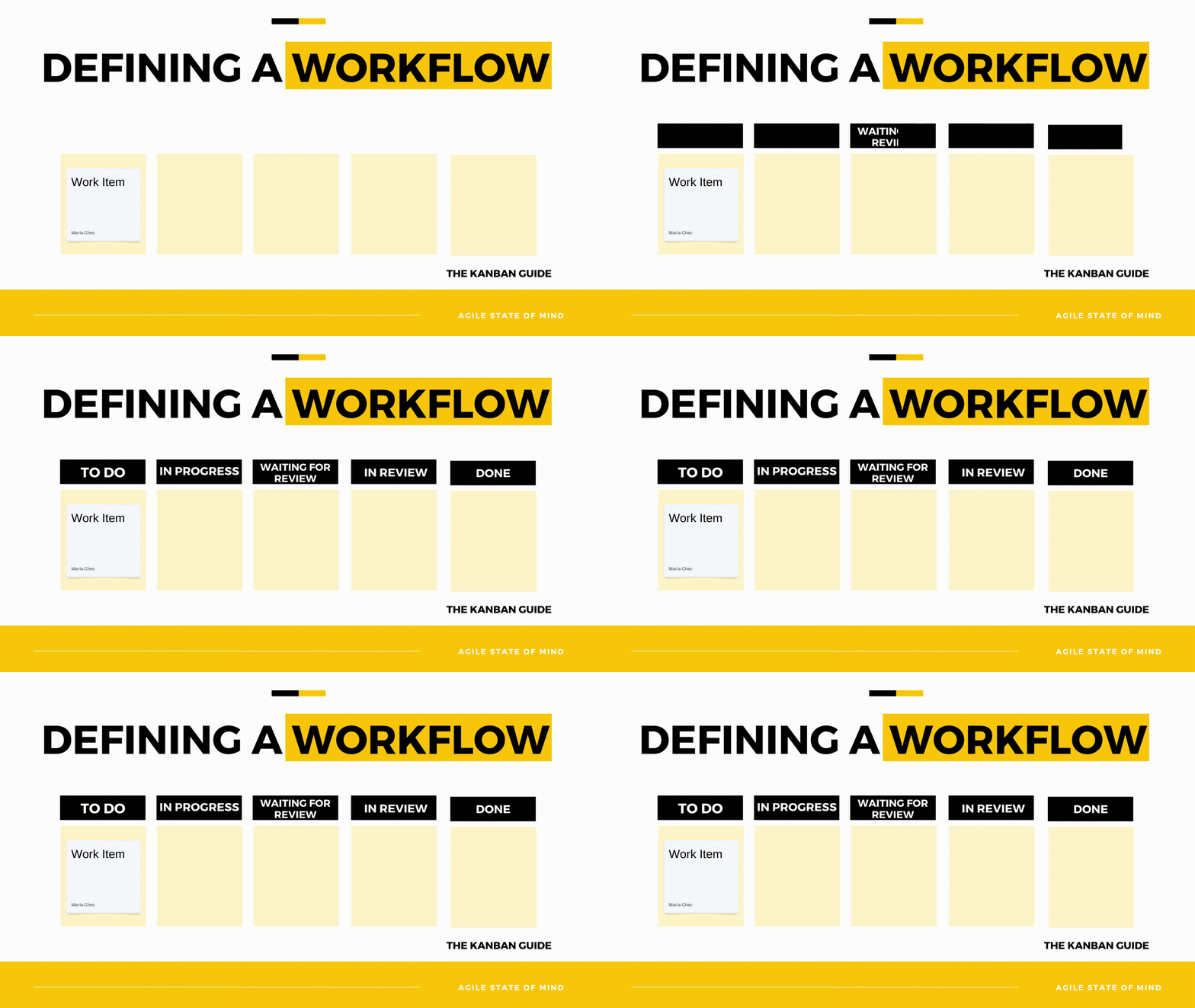
To improve the workflow, we first need to map it out. This is the step where we flesh out the states that our work passes through from the moment it starts, all the way to the moment it’s finished. Here’s an example workflow from one of the teams I work with:
4. Control Work in Progress
“A definition of how WIP will be controlled from started to finished.”
Here’s the big question: how will your team keep WIP under control? Because, as we all know, it is way too easy to let it spiral.
One day you’re “just starting a few things,” and the next, your board looks like a yard sale. And once it does, it becomes chaotic, the team loses its focus and your metrics get polluted. So long speed and predictability!
Fear not, we’ve got some good news! Your team gets to define the rules.
Now, will you set WIP limits for every column? Only for certain steps?

Or perhaps for the whole workflow at once?
What matters is that you make WIP control explicit - so everyone knows when to say “stop starting” and “start finishing.”

5. Policies
“Explicit policies about how work items can flow through each state from start to finish.”
How exactly does a work item move from one state to the next?
That’s where policies come in. Think of them as the “rules of the road” for your workflow. They make the invisible visible, so everyone knows what’s expected before a card can move forward.
It’s a bit like defining a mini Definition of Done (DoD) for each transition:
What must be true before this item can leave In Progress and move to Ready for Review? What conditions need to be met before something can be called Done?
Clear policies reduce debate, cut down on rework, and make the board reflect reality, not just wishful thinking.

6. Service Level Expectation (SLE)
“Which is a forecast of how long it should take a work item to flow from start to finish.”
This is where empiricism comes in, just like in Scrum. An SLE (Service Level Expectation) is your go-to metric for checking the health of your system.
It’s not a formal contract like a Service Level Agreement (SLA). Instead, it’s based on the actual history of your team’s work.
For example:
“In 85% of cases, we finish work within 7 days.”
That’s your SLE - a data-driven forecast.
If a work item’s age starts drifting beyond this expectation, it’s a signal: something might be stuck, blocked, or broken.
In short: know your SLE, watch your item age, and use both as early warning signs for flow problems.

Visualization through Kanban Boards
“The visualization of the DoW is called a Kanban board.”
The old, good Kanban board.

Think of it as a map of your workflow. Every stage of your Definition of Workflow is laid out in front of you. This transparency helps the team see what’s happening, track progress, and spot bottlenecks before they grow.
The Guide also notes that teams may need elements beyond the basic DoW. Things like values, principles, or working agreements. These extras are always contextual, tailored to the team's needs.
Flexibility
Here’s the beauty of Kanban: it’s not prescriptive. Kanban gives you the ground rules, but you decide how to make your workflow and policies transparent. Your imagination and creativity set the limits.
With just a handful of simple practices, teams unlock a whole new level of clarity, focus, and improvement.
Wrapping Up
Defining and visualizing your workflow isn’t just about boards and columns.
It’s about creating a shared understanding of how work flows—and giving the team the tools to actively manage it.
If this got you curious, reach out on LinkedIn if you’re interested in joining my ProKanban training or hosting a session at your company!
Read the whole Kanban series:

