
Lead AI Friday: Researching AI Tools for Your Company - A Practical Guide
A step-by-step framework for evaluating, testing, and implementing AI tools in your organization.

“We need to start using AI tools” - we hear this in every company now. And it makes sense. AI tools promise to boost productivity, streamline workflows, and give your company a competitive edge. But choosing the right tools? That’s where things get tricky.
I’ve had several AI tool research projects and learned some painful lessons. Tools that blew me away in demos more often than not disappointed in actual use. Others that looked perfect on their website created headaches in non-obvious places. And sometimes - this still surprises me - the best solution was already sitting in our software stack, just hidden behind a toggle that nobody took a look at.
This guide walks you through the approach I’ve refined. It’s built on real experience - what actually worked, not what should work in theory. You’ll learn to evaluate tools systematically, test them with real conditions, and implement them without the usual headaches.
Most importantly, you’ll avoid the expensive mistakes so many teams make. Let’s get started.
Steps - overview
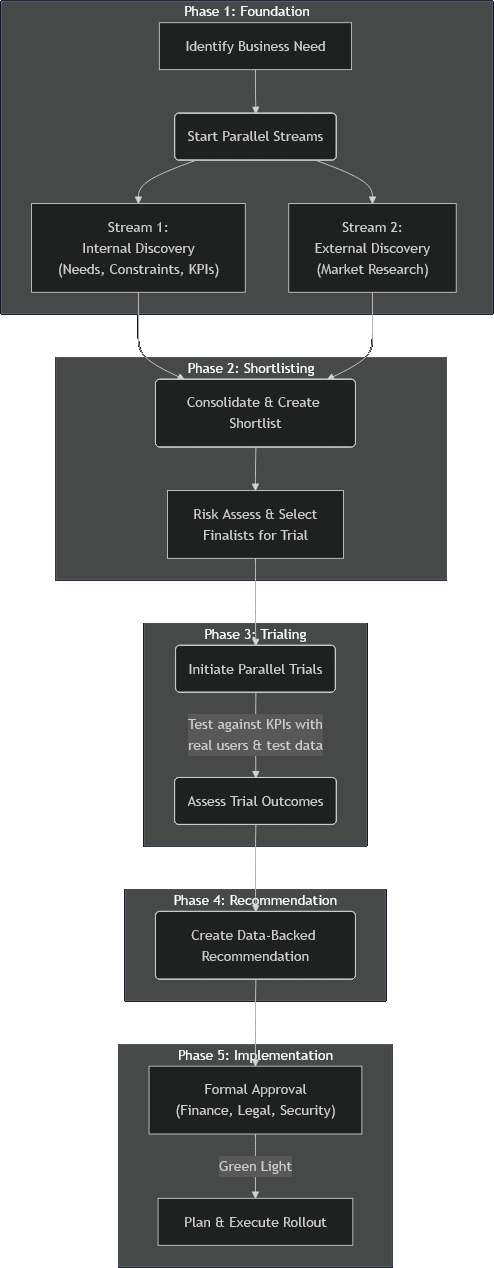
Here’s how we break down the research and implementation process:
Phase 1: Foundation - Run two streams in parallel to save time. While one team identifies internal needs, constraints, and KPIs, another researches available tools and their capabilities.
Phase 2: Shortlisting - Combine findings from both streams to create a shortlist. Assess risks and select 2-3 most promising tools for trial, considering both technical and business requirements.
Phase 3: Trialing - Test shortlisted tools in real conditions with actual users and data. Compare their performance against your KPIs to get meaningful insights, not just demo impressions.
Phase 4: Recommendation - Transform trial results into a data-backed recommendation that addresses both business value and implementation requirements.
Phase 5: Implementation - Get formal approval from stakeholders and execute a well-planned rollout that ensures successful adoption.
Phase 1: Foundation - Laying the Groundwork in Parallel
Every company has dozens of processes that could benefit from AI. The key here is to explore the right ones first. Try to solve everything at once and you’ll get stuck in analysis paralysis.
Look for repetitive, time-consuming tasks that drain your team’s productivity. For example, in one of our company’s cases, we spotted two clear opportunities: people spent way too much time hunting for information across different places, and in meetings, note taking consumes time and attention that could be spent on going forward. Perfect targets for AI.
Here’s the key insight: run two streams in parallel. Getting input from different departments takes forever - all those meetings, rounds of feedback, scheduling delays. Don’t wait. Start researching the market while you’re still figuring out internal needs.
This parallel approach also prevents a trap I’ve fallen into: getting excited about a specific tool before knowing if it actually fits your organization.
After selection, there are two streams you can pursue in parallel to save time:
Stream 1: Internal Discovery (Needs & Constraints)
Stream 2: External Discovery (Market Research)
Stream 1: Internal Discovery - Needs & Constraints
Gathering Requirements
Start with security and compliance requirements - these will remove half your options immediately. Get meetings with InfoSec and Legal scheduled early. Their review processes take a long time. Key questions to address:
What data security standards must tools comply with?
Are there restrictions on where data can be stored or processed?
What authentication methods are required?
While you’re waiting for those meetings, start budget conversations. Don’t ask for a specific number - ask for ranges. “What ROI would justify a $10k investment? What about $50k?” This gives you flexibility during evaluation without surprising anyone later.
Discovering Pain Points
To pick the best AI tools for your needs, you need to know what are the real pain points and how severe they are. This allows you to assess the impact a tool could have and prevent you from chasing unnecessary features.
Survey everyone in the affected departments. Keep it focused and practical:
“What tasks in [area] take up most of your time?”
“Which repetitive tasks do you think could be automated?”
“What’s the biggest challenge you face when [specific activity]?”
“What would help you be more effective in [area]?”
“What concerns would you have about AI handling some of these tasks?”
The survey serves two purposes: identifying pain points and building early buy-in by involving future users in the process.
Setting Success Metrics
For each major pain point identified, define clear, measurable KPIs. For example, if your pain point is meeting documentation taking too much time, your KPIs might be:
Time spent documenting meetings (currently 30 minutes per meeting, target: 10 minutes)
Time required for stakeholders to stay informed (currently 60-minute meeting attendance, target: 5-minute summary review)
Accuracy of action items captured (currently 70%, target: 90%)
User satisfaction with meeting summaries (baseline survey score vs. follow-up)
Other common KPIs include:
Error rates in current processes
Number of manual interventions required
Time spent searching for information
These KPIs will be crucial later for evaluating tools during trials and measuring success after implementation.
Stream 2: External Discovery - Market Research
While Stream 1 is gathering internal requirements, start researching what’s available in the market. The goal here is breadth, not depth - you want to identify all viable options before diving deep into any specific tool.
Finding Tools
Start with a combination of manual research and AI assistance. Use search engines, industry publications, and peer recommendations to build your initial list. For AI-powered research, tools like Super Deep Research can help you discover options you might miss manually.
For each tool you discover, gather basic information:
What core features does it offer?
Which of your identified pain points could it address?
What’s the rough implementation complexity?
Is pricing information publicly available?
Don’t Forget Your Existing Tools
Before getting excited about new solutions, inspect what you already have. Many companies discover powerful AI capabilities hidden in tools they’re already paying for, as was the case for us. Check if your current software stack includes AI features that are simply not enabled or not widely known.
This path often offers the best cost-benefit ratio since:
No additional licensing costs (or minimal upgrade fees)
Users are already familiar with the interface
Integration with existing workflows is seamless
Lower implementation risk
In our experience, tools like Confluence’s Rovo for knowledge management and Teams AI for meeting analysis often outperformed specialized third-party solutions while requiring minimal additional investment.
Getting Pricing Information
Unfortunately, most AI tools don’t publish pricing online. Especially the enterprise ones. Start reaching out to sales teams early - these conversations take a week or two to schedule.
Be efficient about it. Use the same email template for multiple companies. Be upfront about your timeline and evaluation process. You’re not committing to anything by asking for pricing.
Don’t get lost in deep dives yet. Your goal is building a comprehensive list with enough info to make smart decisions in Phase 2.
Phase 2: Shortlisting - From Many Options to Few Finalists
By now you have two things: clear understanding of your needs and constraints, and a solid list of potential tools. Phase 2 is about combining these to create a focused shortlist of 2-3 tools worth testing.
Initial Filtering
Start by cutting the obvious non-starters, that:
Don’t address your primary pain points
Exceed your budget constraints (if you have pricing information)
Fail to meet mandatory security or compliance requirements
Require technical capabilities you don’t have
Don’t overthink this step. If a tool clearly doesn’t fit, cut it now instead of wasting time analyzing it further.
Cost-Benefit Analysis
For the remaining tools, create a simple cost-benefit comparison. Look at both initial costs and ongoing expenses:
Costs:
Licensing fees (one-time and recurring)
Implementation effort (time, training, integration)
Maintenance and support requirements
Potential disruption during rollout
Benefits:
Potential time savings based on your KPIs
Quality improvements in current processes
Reduction in manual errors or interventions
User satisfaction improvements
Don’t aim for perfect precision - rough estimates work fine for comparison.
One important consideration: if a tool shows exceptionally high ROI potential, it might justify exceeding your initial budget constraints. A solution that costs 50% more but delivers 300% better results is usually worth the extra investment. Keep an open mind about budget flexibility when the business case is compelling.
Risk Assessment
Before making final selections, assess the risks. This step can save you major headaches later.
Important timing note: For tools requiring deep system integration, complete this risk assessment before trials. For standalone tools, you can test with isolated accounts and run this assessment in parallel with trials to save time.
Key risks to evaluate:
Data security and privacy implications
Integration complexity with existing systems
Vendor stability and long-term viability
User adoption challenges
Watch for permission creep. Some tools, once they access your calendar or email, start automatically inviting colleagues (or worse - clients!) or sharing information in ways you didn’t expect. Read the fine print, especially for tools requesting broad permissions.
Making the Final Selection
Based on your cost-benefit analysis and risk assessment, select 2-3 tools for hands-on testing. Testing multiple tools simultaneously allows for direct comparison and helps compress your overall timeline.
Your shortlist should include:
Tools with the highest potential impact relative to cost
At least one option that represents a “safe” choice (lower risk, proven solution)
If possible, one option that leverages existing tools you already use
Remember: the goal isn’t to find the perfect tool on paper, but to identify the most promising candidates for real-world testing.
Phase 3: Trialing - Testing Tools in Real Conditions
This is where theory meets reality. You’re putting your shortlisted tools in front of actual users with real data to see how they perform in your specific environment.
Setting Up Trials
For enterprise tools needing integration: Work with IT to set up proper trial environments. Usually means creating test accounts, configuring permissions, and setting up data connections.
For standalone tools: You might set up trial accounts yourself, no IT involvement needed. Faster and lower risk - perfect for tools that don’t need deep system integration. For those that do need it, you may set up the related services as trials as well.
Pro tip: For AI in tools already in your software stack (Confluence, Teams, Slack), consider enabling them for real-world testing immediately. This worked well for us and showed actual adoption patterns.
Creating Realistic Test Conditions
Here’s a critical lesson: tools look amazing in carefully crafted demos but often break down when faced with real-world messiness. To get meaningful results, test with conditions that mirror your actual work environment.
Use real data (anonymized). Create a realistic test environment with anonymized actual data. This reveals issues that demo data never exposes. Example: a tool that integrates data from multiple sources (documentation, task tracker, communication software) may answer questions contained in one of them perfectly, but struggles to merge the information or decide which is more recent.
Involve actual end-users. The people from your Phase 1 survey should be your primary testers. They understand current pain points and can evaluate whether tools actually solve them.
What to Test and Measure
Focus your testing on the KPIs you defined in Phase 1. For each tool, track:
Performance metrics:
Time savings compared to current processes
Accuracy rates for automated tasks
Error frequency and types
User satisfaction during the trial period
Practical considerations:
How intuitive is the interface for your team?
Does it integrate smoothly with existing workflows?
What’s the learning curve for new users?
Are there unexpected limitations or friction points?
A/B testing approach: When comparing multiple tools, use identical inputs across all candidates. This gives you direct performance comparisons instead of guessing. Since AI outputs can vary for the same input, run each test scenario three times with slight variations (AI systems may cache responses, so change wording slightly). Average the results to account for this natural variability.
Document everything. Keep detailed notes on outcomes, user feedback, and issues. This documentation will be essential for meaningful comparisons and building your final recommendation.
Assessing Trial Results
Update your cost-benefit comparison with real data instead of estimates. Now you have actual performance metrics, which makes comparisons much more meaningful.
Pay attention to:
Tools that exceeded expectations (the modest-looking ones sometimes surprise you)
Unexpected problems that emerged during real use
User adoption patterns - which tools did people actually want to keep using?
The goal: identify which tool provides the best combination of effectiveness, usability, and value for your organization.
Phase 4: Recommendation - Turning Data into Decisions
You’ve completed trials and have real performance data. Time to transform those results into a clear, actionable recommendation that decision-makers can act on confidently.
Analyzing Your Results
Start by consolidating all trial data. Your recommendation should be based on evidence, not gut feelings.
Compare against your original KPIs:
Which tools delivered the promised improvements?
Where did tools fall short of expectations?
What unexpected benefits or problems emerged?
Consider the complete picture:
Initial and ongoing costs (now with actual pricing information)
Implementation complexity and timeline
User adoption rates during trials
Integration requirements and potential issues
Long-term scalability and vendor stability
Writing the Recommendation
Your recommendation document should be clear, concise, and focused on business value. The decision-makers may not have been involved in day-to-day trials, so provide enough context without overwhelming them.
Structure your recommendation:
Executive Summary - Your recommended tool and key reasons why
Trial Overview - What you tested and how
Results Summary - Key findings for each tool tested
Recommendation - Your top choice with clear justification
Implementation Plan - Next steps if approved
Appendix - Detailed data and user feedback
Focus on business impact. Frame your findings in terms that matter to decision-makers: cost savings, productivity gains, risk reduction, and competitive advantage. Use the KPIs you established in Phase 1 to quantify benefits wherever possible.
Address concerns proactively. If your recommended tool has limitations or risks, acknowledge them and explain how they can be mitigated. This builds credibility and shows you’ve thought through the implications.
Leveraging AI for Efficiency
Here’s a practical tip: use AI tools to help draft your recommendation document. Feed the tool your trial data, user feedback, and key findings, then ask it to help structure and flesh out content. Make sure the AI is filling in context and improving clarity - the recommendation decision should remain yours based on your analysis.
Getting Buy-in
Before submitting your formal recommendation, consider discussing findings with key stakeholders. This informal feedback can help you refine the recommendation and build support before the official decision process.
You’ve put weeks or even months into systematic research and testing. Present it confidently, backed by data, focused on the value it brings to your organization.
Phase 5: Implementation - From Approval to Adoption
Your recommendation got approved! Getting the green light is the beginning. Phase 5 is about turning that approval into successful, organization-wide adoption.
Getting Formal Approvals
Even with leadership buy-in, you’ll need formal approvals from several departments before full implementation:
Finance handles contract negotiations, budget allocation, and vendor agreements. Give them all the pricing and contract details you gathered.
Legal and Security conduct final review of terms, data handling agreements, and security protocols. The groundwork you laid in Phase 1 will speed this up significantly.
IT needs to plan technical implementation - system integrations, user provisioning, security configurations.
Planning Your Rollout
Start with a phased approach. This reduces risk and lets you refine implementation based on early feedback before going company-wide.
Consider a pilot group approach:
Start with the most enthusiastic early adopters from your Phase 3 trials
Choose a representative mix of users and use cases
Set a clear timeline for the pilot phase (typically 2-4 weeks)
Gather feedback and iterate before broader rollout
Alternative: gradual expansion:
Roll out to one department or team at a time
Use lessons learned from each group to improve the next rollout
Build momentum through success stories and user testimonials
Training and Documentation
Invest in proper training. Even intuitive tools benefit from structured onboarding.
Create practical training materials:
Focus on real use cases from your organization
Include step-by-step guides for common tasks
Provide troubleshooting tips for known issues
Make materials easily accessible and searchable
Offer multiple training formats:
Live training sessions for interactive learning
Recorded/written tutorials for self-paced learning
Quick reference guides for ongoing use
Champions or super-users who can provide peer support
Measuring Success
Establish clear success metrics to track adoption and impact. Use the same KPIs you defined in Phase 1 to measure progress:
Adoption metrics:
User registration and active usage rates
Feature utilization patterns
Time to first value for new users
Impact metrics:
Improvements in your original KPIs
User satisfaction scores
Productivity gains or time savings
ROI calculations based on actual usage
Monitor and adjust. Be prepared to make adjustments based on real-world usage patterns. The implementation phase often reveals additional optimization opportunities or unexpected challenges.
Your systematic approach to research and testing has set you up for implementation success. Stay engaged with users, monitor your success metrics, and be ready to iterate based on what you learn.
When You Already Have a Tool in Mind
Sometimes you don’t need the full research process. Maybe a colleague recommended a specific tool, you saw an impressive demo, or you have a strong hunch about a particular solution. Here’s how to validate a single tool efficiently while still making a data-driven decision.
What You Still Need to Do
Phase 1 remains critical. Even with a specific tool in mind, you must understand your internal needs, constraints, and success metrics. Skip the market research stream, but don’t skip internal discovery:
Define clear pain points and KPIs
Get security and budget requirements from relevant departments
Survey potential users for their needs and concerns
This foundation is essential. Without it, you’re hoping the tool works rather than validating it systematically.
Risk assessment becomes more focused. Instead of comparing multiple tools, conduct a thorough risk assessment of your chosen tool. Can it meet your security requirements? Does it fit your budget? What are the integration challenges?
Trial with real conditions. This is non-negotiable. Set up a meaningful trial using the same principles from Phase 3: real(-like) data, actual users, and measurement against your KPIs.
What You Can Skip or Compress
Market research - you’re not comparing options, so extensive market research isn’t needed. But do a quick check to ensure you’re not missing an obvious alternative, especially among tools you already use.
Shortlisting process - no need for cost-benefit matrices comparing multiple tools. Focus on whether this single tool meets your minimum bar for success.
Parallel testing - you can’t compare tools side-by-side, but you can still compare against your current process and baseline metrics.
The Key Question
Your evaluation should answer one simple question: “Does this tool deliver enough value to justify its cost and implementation effort?”
If yes based on trial data and user feedback, proceed with recommendation and implementation phases as outlined above. If not, you may need to expand your search or reconsider whether AI is the right solution for this particular problem.
This compressed approach works well when you have high confidence in a specific tool, but don’t let enthusiasm bypass the validation process entirely. Even promising tools can surprise you - sometimes disappointingly, sometimes pleasantly.
Conclusion
Researching AI tools doesn’t have to be overwhelming or random. By following this five-phase framework - Foundation, Shortlisting, Trialing, Recommendation, and Implementation - you can move from “we should use AI” to “we’re successfully using AI” with confidence.
The key insights that will serve you well:
Work in parallel whenever possible. Don’t wait for perfect information before starting the next step. Run internal discovery alongside market research, and consider parallel trials when feasible.
Test with real conditions. Demos and marketing materials can’t tell you how a tool will perform with your actual data, users, and workflows. Create realistic test environments and involve the people who will actually use the tool.
Don’t overlook what you already have. Some of the best AI implementations come from capabilities hidden in tools you’re already paying for. Check your existing software stack before committing to new solutions.
Measure what matters. Define clear KPIs upfront and use them consistently throughout your evaluation. This transforms subjective opinions into objective decisions.
The systematic approach outlined here has helped us avoid expensive mistakes while discovering valuable solutions that might have been overlooked in a less structured process. It works whether you’re evaluating a dozen tools or validating a single promising option.
AI tools can transform how your team works, but only if you choose and implement them thoughtfully. Take the time to do the research properly - your future self will thank you for the systematic approach when you’re seeing real productivity gains instead of dealing with an expensive tool nobody uses.
Ready to start your AI tool research? Begin with Phase 1 and define those pain points and KPIs clearly. Everything else builds from there.